CEH2024-10.1.17 Sniffing

1. Network sniffing tools

  1. Cain and Abel is a collection of tools that includes ARP poisoning. Cain and Abel redirects packets from a target by forging ARP replies.
  2. Ettercap is a sniffing tool with multiple functions that can be used for ARP poisoning, passive sniffing, packet grabbing, and protocol decoding.
  3. TCPDump is a command line sniffer designed for the Linux environment.
  4. Ufasoft snif is a sniffing tool that has capturing, analyzing, and decryption features.
  5. WinDump is the windows version of TCPdump.
  6. Wireshark is a network packet analyzer that tries to capture network packets and display the data they carry in as much detail as possible.
  7. Shark is a tool that is used to create botnets.
  8. KFSensor is a Windows host-based intrusion detection system. It acts as a vulnerable server to attract hackers and record their activities.

2. WinDump command line sniffer
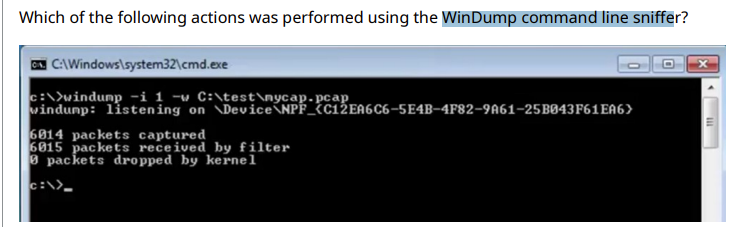
Requested that hexadecimal strings be included from interface 1 to mycap.pcap.

The command line request is to collect packet capture files from -I (interface) and -w (write) them to the C:testmycap.pcap file.

The read request on interface 1 would be -I 1 -r C:testmycap.pcap.

The hexadecimal string output is the -x option, which is not requested in this capture command.

The asci string output is the -a option, which is not requested in this capture command.

3. using Ettercap in an attempt to spoof DNS

To successfully complete the configuration of your DNS spoofing test, you need to select the ARP poisoning option. ARP requests and replies are sent to victims to poison their ARP cache. Once the cache has been poisoned, the victim sends all packets to the attacker, who modifies them and forwards them to the real destination.

Port stealing is used to sniff a switched environment when ARP poisoning is not effective (for example, where static mapped ARPs are used).

DHCP spoofing pretends to be a DHCP server and tries to force the client to accept the attacker’s reply.

NDP poisoning is only supported if IPv6 support is enabled. ND requests and replies are sent to victims to poison their neighbor cache. Once the cache has been poisoned, the victims send all IPv6 packets to the attacker, who can modify them and forward them to the real destination.

4. MAC Address Poisoning

  • Address Resolution Protocol (ARP) poisoning is when an attacker sends fake ARP messages to link their MAC address with the IP address of a legitimate computer or server on the network. Once their MAC address is linked to an authentic IP address, the attacker can receive any messages directed to the legitimate address. As a result, the attacker can intercept, modify, or block communications to the legitimate MAC address
  • Port mirroring creates a duplicate of all network traffic on a port and sends it to another device.
  • MAC flooding is when an attacker intentionally floods a content addressable memory table with Ethernet frames, each originating from different MAC addresses. Once the table starts to overflow, the switch responds by broadcasting all incoming data to all ports, basically turning itself into a hub instead of a switch.
  • MAC spoofing is done to enable bypassing of access control lists on servers or routers by either hiding a computer on a network or by allowing it to impersonate another network device.

5. using tcpdump to capture suspicious traffic detected on port 443 of a server.

  • -SX is the command line options for both full packet capture and hexadecimal and ascii output of port 443.
  • The tcpdump src port will capture source port traffic on 443 but will not capture the entire packet or output the hexadecimal and ascii codes.
  • -SA will capture full packets, but only ascii output is included.
  • -SXX performs the same function as -SX and also gives the Ethernet header

6. Wireshark Filtering

  • The ne filter stands for not equal. This (ip.src ne 192.168.142.3) command will display all traffic not equal to 192.168.142.3.
  • == stands for equal to, && stands for and, and eq is another way to write equal to.

7. Wireshark

When using Wireshark to detect ARP poisoning, Wireshark displays a duplicate use of IPs detected.

Even without this message, seeing two packets with the same IP address is a good indication that ARP poisoning is taking place on your network

8. Wireshark Filters

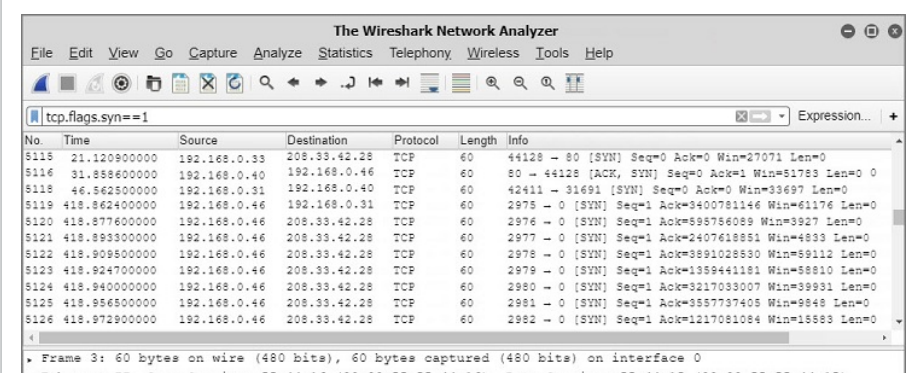
The net filter captures traffic to or from a range of IP addresses. Since the network address of 192.168.0.0 was used, only packets with either a source or destination address on the 192.168.0.0 network are displayed.

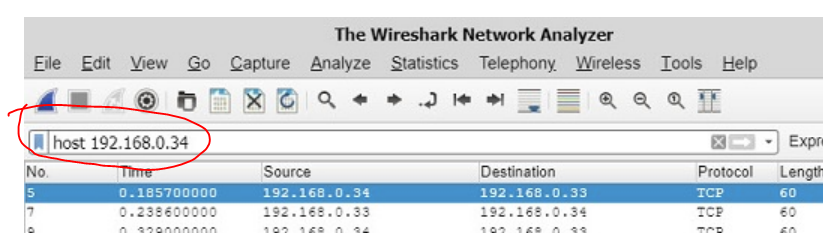
9. Wireshark Host filter

10. Wireshark Password filter

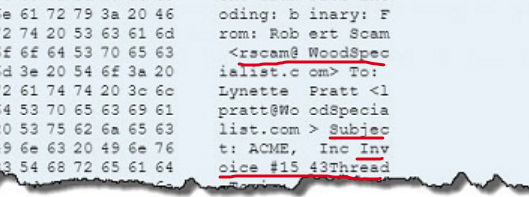
11. Using the tcp contains Invoice filter
12. Company Requestions Payment

13. Best Countermeasure for sniffing

Using encryption methods is the best practice to secure network traffic in this scenario. It becomes one of the last lines of defense. If the encryption method used is strong enough, it will take the attacker too long to decrypt the obtained encrypted traffic to be worth the effort.

An IDS is used to detect intrusion and to alert network administrators of attacks. These systems can search for anomalies in network traffic. They send an alert when an intrusion is detected and are not used as a countermeasure to secure network traffic that has already been obtained by an attacker.

Implementing policies and promoting network security awareness training are good countermeasures, but they will not protect the data that has been obtained by an attacker.

Closing unnecessary ports associated with known attacks and only allowing necessary applications to run lessens the attack arena and are good network attack countermeasures. These countermeasures do not secure network traffic already obtained.

14. Countermeasure against sniffing

  • Switched networks provide a natural barrier for an attacker using a sniffer. Be sure to configure settings so the switch shuts down a port when the max number of MAC addresses is reached, so MAC flooding isn’t possible.
  • Session hijacking is the process of taking over an established connection between a host and a user.
  • DNS spoofing, also known as DNS cache poisoning, targets Active Directory or other DNS-reliant networks.
  • Packet filtering firewalls look at a packet’s header information to determine legitimate traffic.
SOA#Module28 – Threat detection with Microsoft Sentinel analytics

In this module, you learned how Microsoft Sentinel Analytics can help the SecOps team identify and stop cyber attacks.

Learning objectives

In this module, you will:

Explain the importance of Microsoft Sentinel Analytics.

Explain different types of analytics rules.

Create rules from templates.

Create new analytics rules and queries using the analytics rule wizard.

Manage rules with modifications.

This module is part of these learning paths

SOA#Module29 – Connect threat indicators to Microsoft Sentinel

Learn how to connect Threat Intelligence Indicators to the Microsoft Sentinel workspace using the provided data connectors.

Learning objectives

Upon completion of this module, the learner will be able to:

<![if !supportLists]>· <![endif]>Configure the TAXII connector in Microsoft Sentinel

<![if !supportLists]>· <![endif]>Configure the Threat Intelligence Platform connector in Microsoft Sentinel

<![if !supportLists]>· <![endif]>View threat indicators in Microsoft Sentinel

Prerequisites

Basic experience with Azure services

This module is part of these learning paths

Security-Operations-Analyst-Challenge

Gain expertise in monitoring, identifying, investigating, and responding to threats by using Microsoft Sentinel, Microsoft 365 Defender, and third-party security solutions. This learning journey has been designed to equip you with the necessary skills for effectively incorporating AI-driven security within your organization. In about 34 hours, you’ll learn how to minimize risks by swiftly addressing active attacks, suggesting threat protection improvements, and reporting policy violations to stakeholders.

https://learn.microsoft.com/en-us/collections/ddkzh4m1y5nm?WT.mc_id=cloudskillschallenge_d85c265a-7558-4f7a-9f8e-8f78fa378196

CEH10.3.13 Denial of Service DoS Practice Questions

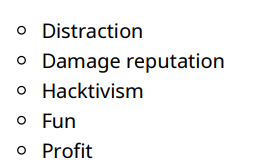
3. The following are motivation for DoS and DDoS Attacks: Distraction Damage reputation Hacktivism Fun Profit

4. Type of attacks

Volumetric attacks block traffic by taking up all available bandwidth between the target and the Internet.

Fragmentation attacks target a system’s ability to reassemble fragmented packets.

Amplification attacks exploit vulnerabilities in protocols and broadcast networks. The name is derived from the idea that the attacker uses intermediary computers and networks to amplify the impact of their attack.

Phlashing, also known as bricking, involves pushing incorrect updates to a system’s firmware, causing irreversible damage and rendering the device about as useful as a brick.

5. Tools to create botnets

Botnets are typically used to carryout DoS and DDoS attacks. You can use the following tools to create botnets:

  • Shark
  • PlugBot
  • Poison Ivy

Trin00 is a set of programs used for DoS attacks.

Jolt2 is a DoS tool that sends numerous fragmented packets to a Windows machine.

Targa is a multifunctional tool that can execute WinNuke and teardrop attacks.

Low Orbit Ion Cannon (LOIC) is a free and easy to use DoS tool.

6. DoS Attack Types

A Fraggle attack is a DoS attack that targets UDP protocol weaknesses. A large number of UDP packets from a spoofed IP address are broadcast to a network in an attempt to flood the target computer.

A Smurf attack is a DoS attack that targets ICMP protocol weaknesses.

A SYN flood exploits the TCP three-way handshake. An attacker creates SYN packets with a non-existent source address. When the target machine responds with a SYN-ACK, it goes to the non-existent address, causing the target machine to wait for a response that they will never get.

A Teardrop attack prevents TCP/IP packets from being reassembled. This is done by setting the flags on all frames to indicate that they are fragments and providing instructions to connect to another frame that doesn’t actually exist.

7. Ping command options

ping -n defines the number of echo requests to send.

ping -a is used to resolve adresses to hostnames.

ping -l is used to send the buffer size.

ping -f is used to set the don’t fragment flag in packet.

8. Detecting a DDoS attack with Wireshark

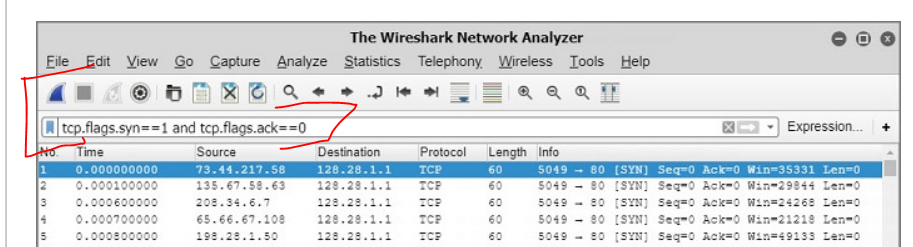
The captured and filtered packets show many SYN packets being sent from many different sources, but all destined for the same target or destination address. This is a strong indication that a DDoS attack is currently happening.

Whether they are legitimate or created by a hacker, SYN packets have a hex value of 0x002.

Since a DDoS flood is happening, there isn’t time or bandwidth available to see many (if any) matching SYN-ACK packets.

9. Detecting an ICMP flood with Wireshark

In comparison to the occasional ICMP ping requests that can be seen on a network, when an ICMP flood attack is happening, the ICMP packets are sent in quick succession from the same source IP address.

As a result, there is little bandwidth available to receive many (if any) ACK or SYN packets. As can be seen from the packets captured, normal ICMP packets can come from different source addresses, such as 192.168.0.33 and 192.168.0.31.

The ping command will send 4 by default if -n isn’t used.

11. Which best describes a reverse proxy method for protecting a system from a DoS attack?

When a DoS attack occurs and a proxy server takes the impact, this is known as a Reverse Proxy DoS protection method. This method redirects all traffic to the reverse proxy before it is forwarded to the real server.

Creating an area of the network called a black hole, where offending traffic is forwarded and dropped, is another attack protection method called Black Hole Filtering. Enabling router throttling can limit the potential impact of a DoS attack and can provide a bit of additional time for administrators to respond to an attack.

Adding extra services, such as load balancing and excess bandwidth, can help provide too many platforms for the attacker to be able to flood. This method is called absorbing the attack.

12. Creating an area of the network where offending traffic is forwarded and dropped is known as what?

Black hole filtering creates an area of the network called a black hole where offending traffic is forwarded and dropped.

Router throttling limits the potential impact of a DoS attack and can provide a bit of additional time for administrators to respond to an attack.

All traffic is redirected to the reverse proxy before being forwarded to the real server. In the event of an attack, the proxy takes the impact.

Anti-spoofing measures ensure that spoofed packets are unable to infiltrate your network.

14. Which of the following best describes the response you should take for a service degradation?

To respond to a service degradation, services can be set to throttle or even shut down in the event of an attack.

You should have more than one upstream connection to use as a failover in the event of a flooding attack.

To absorb an attack, add extra services such as load balancing and excess bandwidth so that you have too much on your network for the attacker to execute a flood attack.

Your response plan should include a checklist of all the threat assessment tools and hardware protections that you have in place.

Russia Hacked Microsoft Execs

Microsoft has been forced to disclose it was hacked by the Russian state. The hackers were inside Redmond’s network for a month and a half.

Putin’s goons got in easily, by spraying passwords at a test server until they succeeded—which really shouldn’t be possible. Then they pivoted to the production environment—which really shouldn’t be possible.

Russia Hacked Microsoft Execs — SolarWinds Hackers at it Again (https_securityboulevard.com)